
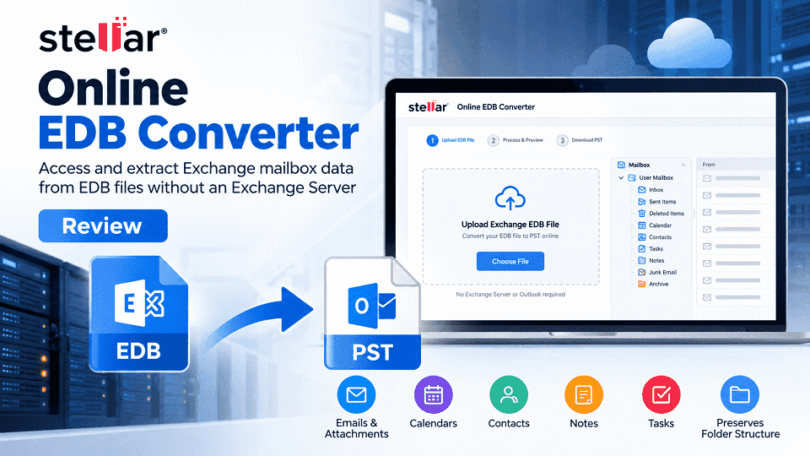

Stellar’s Free Online EDB Converter is a browser-based utility that extracts mailbox data from Microsoft Exchange Database (EDB) files and converts it to Outlook Personal Storage Table (PST) files. It targets IT administrators, businesses, and users who need to access offline Exchange mailbox data without rebuilding the original server environment.
The service supports emails, attachments, contacts, calendars, notes, tasks, and mailbox folders. It also provides a browser-based preview and delivers converted mailboxes as PST files inside a ZIP archive.
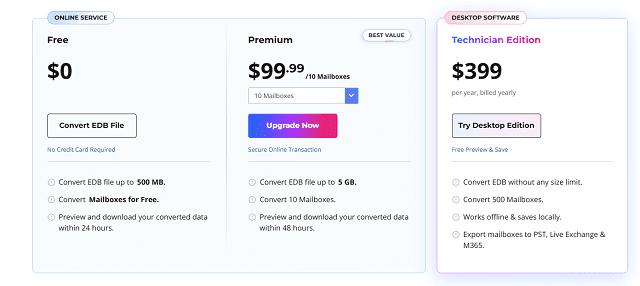
The free plan supports one EDB file up to 500 MB, while the premium online plan supports files up to 5 GB for $99.99 and allows conversion of up to 10 mailboxes. The free plan keeps converted data for 24 hours, and the premium plan keeps it for 48 hours.
In this review, we examine its technical capabilities, conversion workflow, data integrity considerations, security, pricing, and limitations to help you determine whether the online service fits your Exchange data extraction requirements.
What Is Online EDB Converter by Stellar?
Online EDB Converter by Stellar is an online EDB-to-PST conversion service that extracts mailbox information from supported Exchange database files.
An EDB file stores Exchange database information, including mailbox data and related structures. Accessing this information can become difficult when the original Exchange Server is unavailable, a server has been decommissioned, or an administrator needs to retrieve historical mailbox records.
The online EDB to PST converter provides an alternative to setting up a working Exchange environment solely to access the stored mailboxes. Users upload an EDB file, allow the service to analyze and convert it, preview mailbox structure and item counts, and download the resulting PST files.
The online service does not require Exchange Server or Outlook to be installed on the computer performing the conversion. However, compatible software may be required later to open or import the PST files.
According to Stellar’s official product page, the online converter supports EDB files associated with Exchange Server versions ranging from Exchange 5.5 to Exchange Server Subscription Edition (SE). Compatibility with a particular database should still be confirmed before processing critical data.
Stellar Online EDB Converter: Free vs. Premium vs Desktop
| Feature | Free | Premium | Desktop (Technician) |
| Price | $0 | $99.99 | $399 |
| Maximum EDB size | 500 MB | 5 GB | No file size limit |
| Conversion allowance | One EDB file per session | One EDB file per request | Multiple EDB files |
| Mailbox allowance | Up to 10 mailboxes | Up to 5 to 50 mailboxes | Up to 500 mailboxes |
| Download availability | 24 hours | 48 hours | Save converted files locally |
| Output | PST files in a ZIP archive | PST files in a ZIP archive | PST files |
| Exchange Server required | No | No | No |
| Outlook required for conversion | No | No | No |
Is the Premium Plan Worth the Cost?
The free plan is suitable for testing the workflow or extracting data from a small EDB file. It provides a practical starting point without an upfront payment.
The premium plan is more appropriate when the source file exceeds 500 MB but remains within 5 GB, and the required mailbox count fits the plan’s allowance. At $99.99, it may be reasonable for a one-time extraction task.
 However, organizations with larger databases or recurring conversion requirements should compare the online service with Stellar Converter for EDB, a dedicated desktop tool with advanced mailbox conversion and export capabilities. It supports online and offline EDB files without file-size limitations and can export mailbox data to PST, EML, MSG, HTML, RTF, and PDF formats. Users can preview mailbox contents, selectively convert individual mailboxes or items, and apply advanced filters based on date ranges, sender IDs, and specific folders.
Additional features include parallel processing of up to eight mailboxes simultaneously, mailbox prioritization, archive mailbox conversion, and direct export of mailboxes and public folders to Live Exchange Server or Microsoft 365. The software can also export Exchange contacts, including Global Address List entries, to CSV and save scan information for future use. For large EDB files exceeding 45 GB, it can automatically split the resulting PST data into smaller files.
These capabilities make Stellar Converter for EDB suitable for IT administrators handling large Exchange databases, accessing legacy or offline mailbox data, or requiring flexible export options. Unlike the browser-based Stellar Online EDB Converter, the desktop software processes data locally and supports direct exports to Exchange Server and Microsoft 365. These features are specific to the desktop product, so users should verify the capabilities of their selected edition before purchasing.
How to Convert an EDB File with Stellar Online EDB Converter?
The conversion process follows a straightforward sequence.
- Sign it: Either use Gmail credentials or use other email to login on service page.
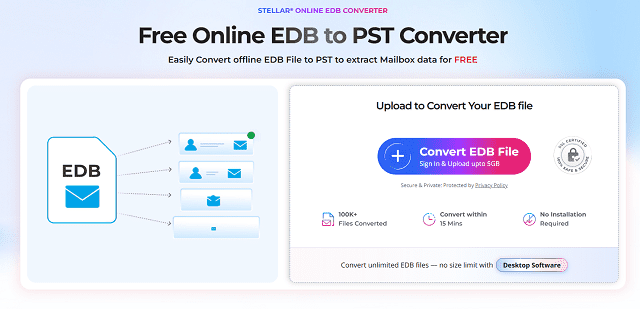
- Upload the EDB file: Select the source database and confirm that it falls within your plan’s size limit.
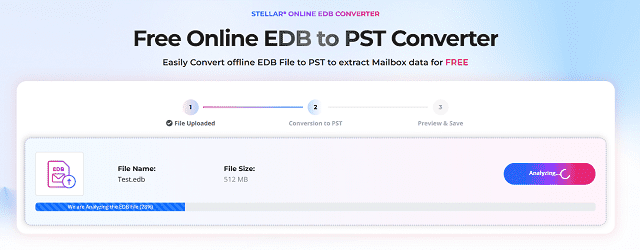
- Analyze and convert: Allow the service to process the database and extract supported mailbox data.
- Preview the results: Inspect the available mailboxes, folder structure, and item counts.
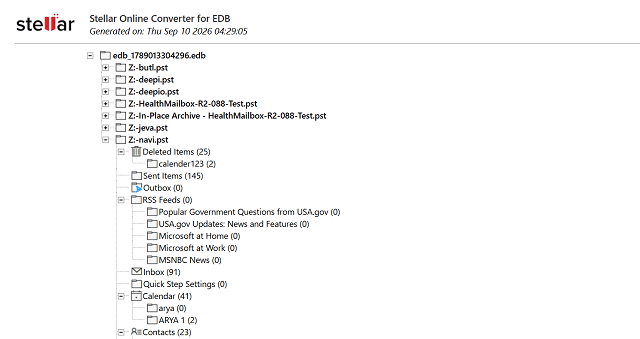
- Download the ZIP archive: Save the converted PST files before the download window expires.
- Extract and validate: Unzip the archive, open the PST files using compatible software, and check important mailbox items.
For production use, retain an untouched copy of the original EDB file. Do not remove the source backup until the conversion has been validated and the required records are accessible.
Security and Privacy Considerations
Exchange databases may contain confidential correspondence, customer information, employee records, and business documents. Uploading them to a third-party service introduces a data-handling consideration that should be evaluated before conversion.
Stellar states that the online service uses an encrypted connection and automatically deletes uploaded and converted data within the applicable retention period: 24 hours for free users and 48 hours for premium users.
These safeguards are useful.
Before uploading sensitive data, review Stellar’s current privacy policy and your organization’s data-processing rules. For confidential databases that must remain within a controlled environment, local desktop processing may be more appropriate.
Pros and Cons
Pros
- Converts supported offline EDB files without a running Exchange Server.
- Requires no local conversion software or Outlook installation.
- Supports common mailbox items and folder previews.
- Provides PST output in a downloadable ZIP archive.
- Offers free conversion for files up to 500 MB.
Cons
- The online file-size limit is 5 GB, even on premium.
- The premium conversion costs $99.99.
Final Verdict
Online EDB Converter is a practical option for extracting mailbox data from supported offline Exchange databases without rebuilding the original server environment. Its browser-based workflow, mailbox HTML preview, and PST output make it suitable for occasional extraction and archival tasks.
The free plan is useful for databases up to 500 MB, while the $99.99 premium plan extends the limit to 5 GB and supports up to 10 mailboxes. The short download windows, upload dependency, and cloud-processing model are its main trade-offs.
Our recommendation: Use the free plan for small, non-sensitive databases. Choose premium when the file size and mailbox allowance fit your requirements. For large-scale extraction, repeated conversions, or strict data-residency requirements, evaluate desktop tool that offer local processing and broader export capabilities.
Overall, Online EDB Converter by Stellar is worth considering for straightforward EDB-to-PST extraction, provided you verify the converted data and understand the limitations of the online service.